Trashbot
A Game For Change
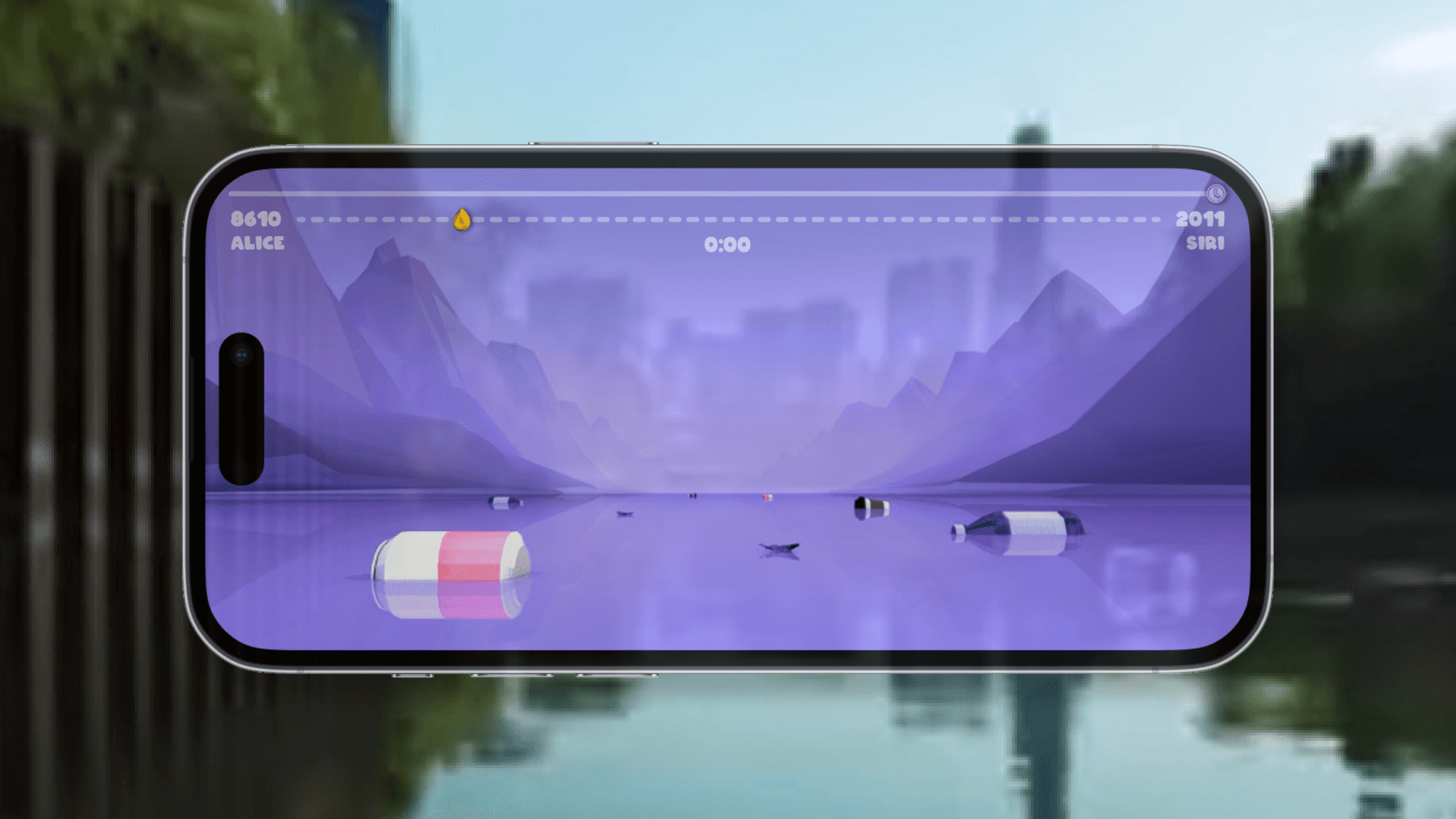
AR mobile game for anyone from anywhere to participate in cleaning up the North Branch of Chicago River. Players will become river guardians and join the championship of collecting trash by remotely driving the trashbot. In the meantime, real trash will be removed from the river.
Timeline
Jun 2020 - Aug 2020 March 2021 - Apr 2021 (5 Months)
Role
Game Design, UI/UX Design, 3D Design, Game Development
Tool
Sketch, Figma, Cinema 4D, Processing
Teammate
/
Instructor
Nikita Pashenkov (for Processing Demo)
Trashbot
A Game For Change
AR mobile game for anyone from anywhere to participate in cleaning up the North Branch of Chicago River. Players will become river guardians and join the championship of collecting trash by remotely driving the trashbot. In the meantime, real trash will be removed from the river.
Timeline
Jun 2020 - Aug 2020 March 2021 - Apr 2021 (5 Months)
Role
Game Design, UI/UX Design, 3D Design, Game Development
Tool
Sketch, Figma, Cinema 4D, Processing
Teammate
/
Instructor
Nikita Pashenkov (for Processing Demo)
Trashbot
A Game For Change
AR mobile game for anyone from anywhere to participate in cleaning up the North Branch of Chicago River. Players will become river guardians and join the championship of collecting trash by remotely driving the trashbot. In the meantime, real trash will be removed from the river.
Timeline
Jun 2020 - Aug 2020 March 2021 - Apr 2021 (5 Months)
Role
Game Design, UI/UX Design, 3D Design, Game Development
Tool
Sketch, Figma, Cinema 4D, Processing
Teammate
/
Instructor
Nikita Pashenkov (for Processing Demo)
Trashbot
A Game For Change
AR mobile game for anyone from anywhere to participate in cleaning up the North Branch of Chicago River. Players will become river guardians and join the championship of collecting trash by remotely driving the trashbot. In the meantime, real trash will be removed from the river.
Timeline
Jun 2020 - Aug 2020 March 2021 - Apr 2021 (5 Months)
Teammate
/
Role
Game Design, UI/UX Design, 3D Design, Game Development
Instructor
Nikita Pashenkov (for Processing Demo)
Tool
Sketch, Figma, Cinema 4D, Processing
A bigger screen unlocks the magic
This story has large visuals and videos. For the full experience, please open on desktop 💻
A bigger screen unlocks the magic
This story has large visuals and videos. For the full experience, please open on desktop 💻
A bigger screen
unlocks the magic
This story has large visuals and videos. For the full experience, please open on desktop 💻
🎮 Processing Demo
Tap anywhere to move your trash robot and collect as much trash as you can in 20 seconds.

Please click the "▶ ︎Run" button at the top of the window to run the game demo.
How might we combine entertainment with environmental protection to expand the impact of gaming?
Background
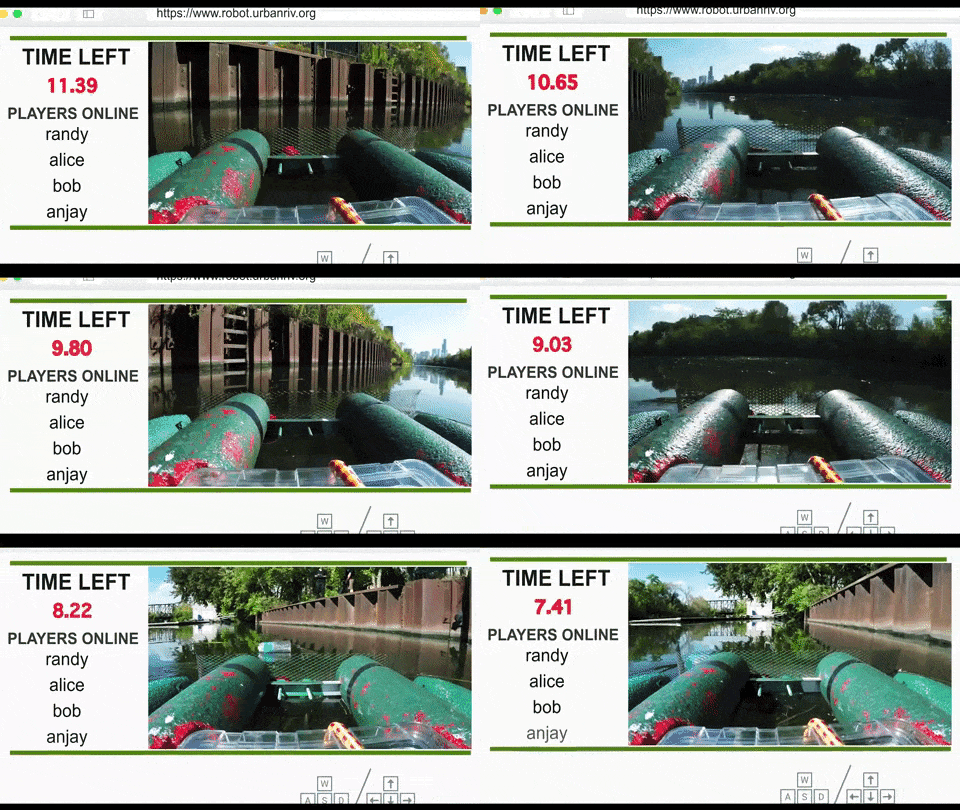
Trashbot is designed by Urban Rivers (USA) and it is a robot that let anyone drive around and clean the North Branch of the Chicago River from anywhere.
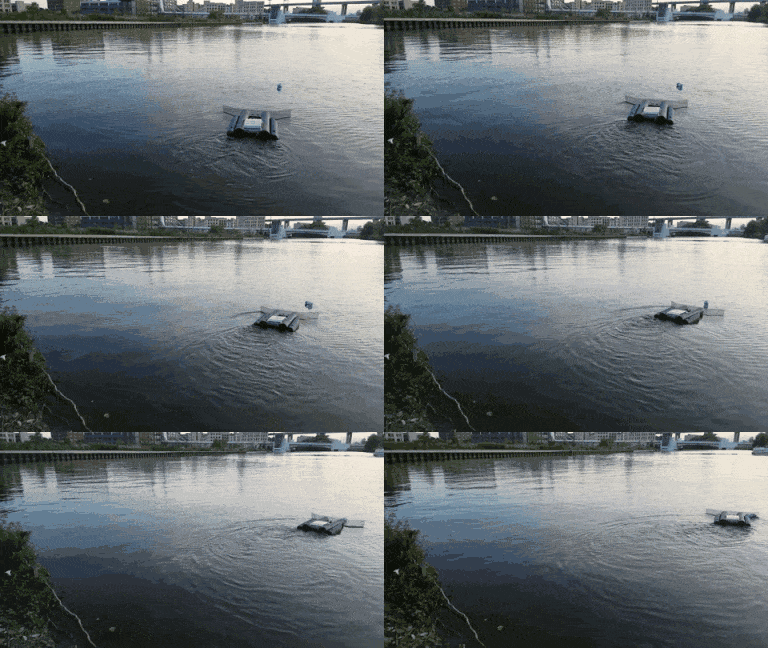
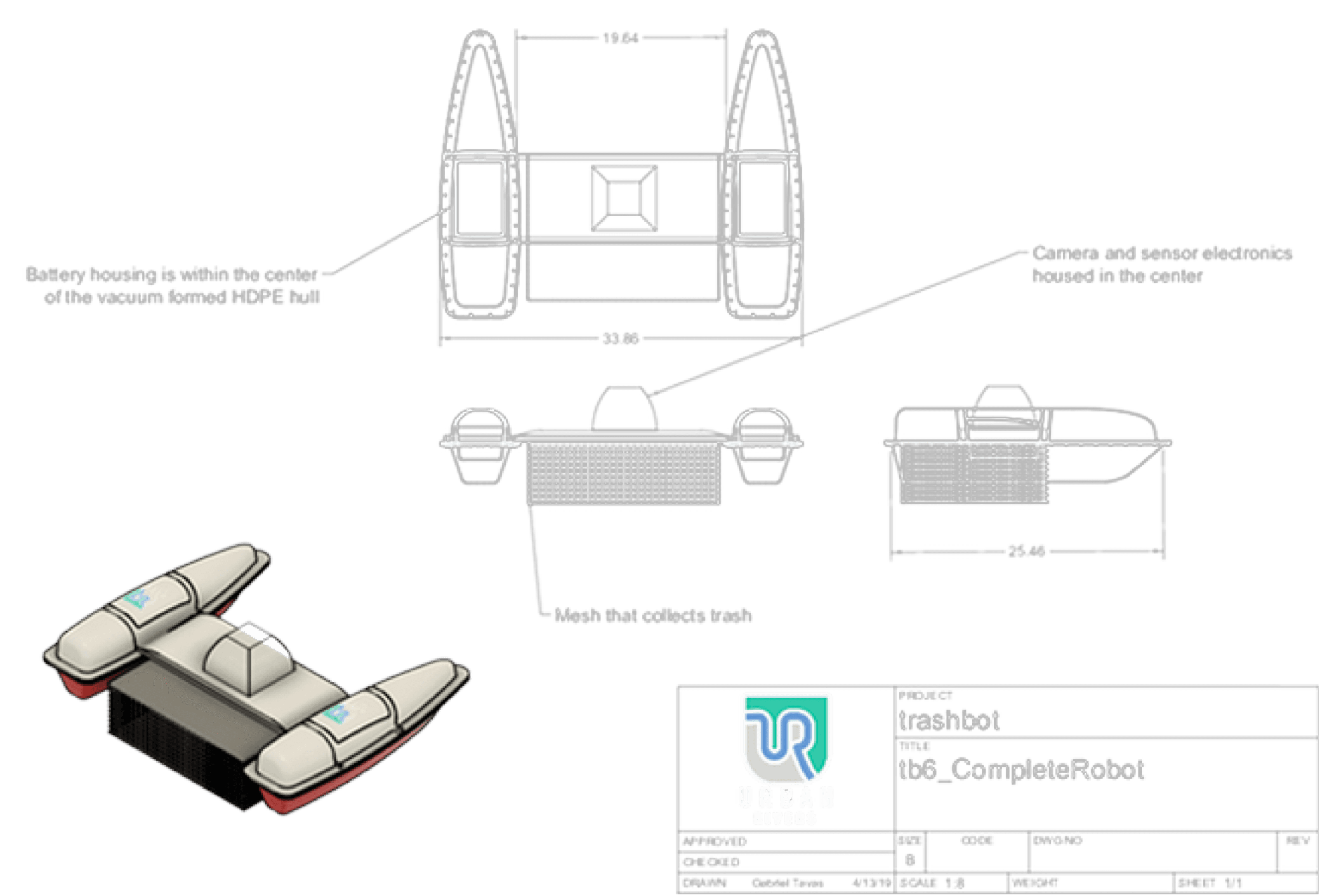
How the Real Trashbot Works
How the Real Trashbot Works

Original Game Analysis
Original Game Analysis
Advantages
Players can drive the trash robot on a website and real trash will be removed from the river.
Players can drive the trash robot on a website and real trash will be removed from the river.
Anyone can play at anytime from anywhere.
Anyone can play at anytime from anywhere.
It combines game with environmental protection
It combines game with environmental protection
Disadvantages
Not friendly for mobile phone users
Low mobility - require a keyboard (because the operation is WSAD on keyboard)
Can only play via a website
->
Mobile Game
Not friendly for mobile phone users
Low mobility - require a keyboard (because the operation is WSAD on keyboard)
Can only play via a website
->
Mobile Game
No social networking
For single players only - only show other players’ name without their live score)
->
Championship
No social networking
For single players only - only show other players’ name without their live score)
->
Championship
Operation is not convenient
The live stream area is too small
->
Full-screen immersive game
Operation is not convenient
The live stream area is too small
->
Full-screen immersive game
UI is not attractive
The same game scene can be boring to players after a few times of playing
->
AR + Low-poly style
UI is not attractive
The same game scene can be boring to players after a few times of playing
->
AR + Low-poly style
Unfair for players who play in a harder area but get the same amount of reward as other players
->
Levels with different amount of rewards
Unfair for players who play in a harder area but get the same amount of reward as other players
->
Levels with different amount of rewards
Gameplay Concept
Gameplay Concept
Concept 1
Level Setting
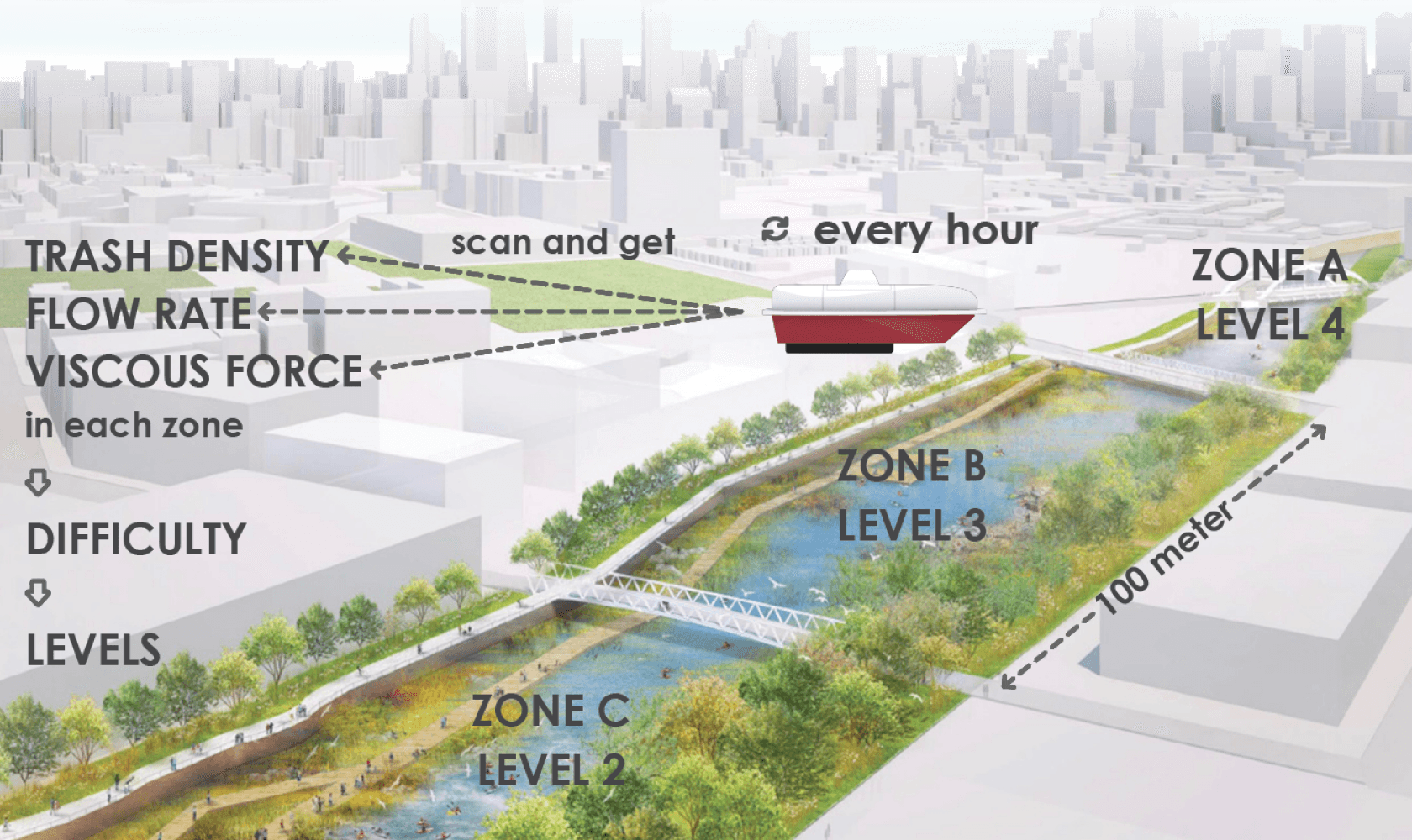
1. We divide 1500 meter North Branch of the Chicago River into 15 zones (every 100 meter is a zone).
2. The trashbots in each zone will scan and get the data (trash density, flow rate of the water and viscous force of the water) of that zone by their sensor electronics.
3. Using data above, we arrange these 15 zones from lowest to highest difficulty and set as Level 1 to Level 15.
The level setting will be refreshed every hour.
Concept 2
Real-Time Environment Mapping with AR
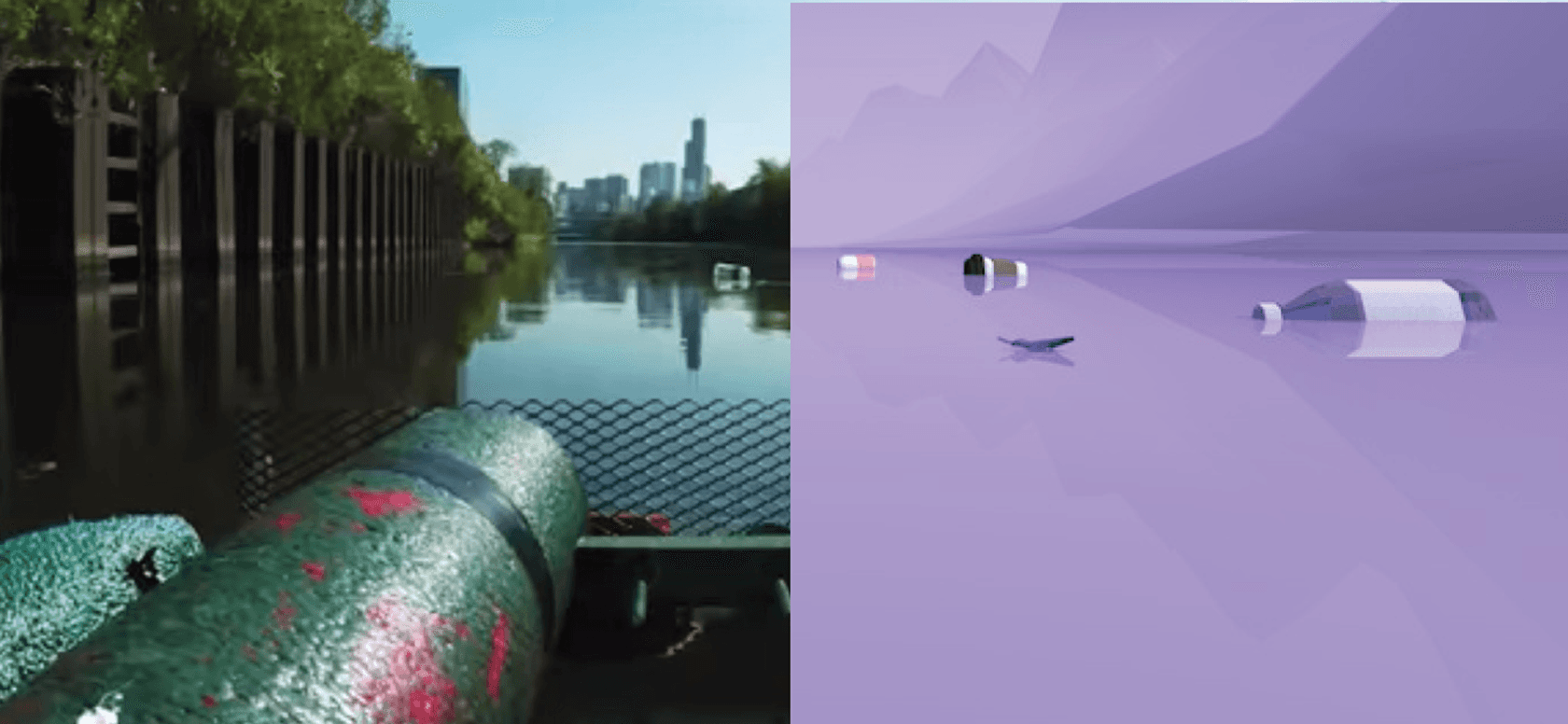
Real-Time Environment Mapping
With Augmented Reality, the camera on the trashbot will track, recognize and convert the environment in real time.
Core Loop
1. Real-time river data defines the difficulty of each zone.
2. Players collect trash, earn rewards, and upgrade trashbot through gameplay.
3. As trashbot improves, players unlock harder zones and complete the loop.
Scan River Data
Scan River Data
Set Level Difficulty
Set Level Difficulty
Collect Trash
Collect Trash
Unlock Harder Zones
Unlock Harder Zones
Upgrade Trashbot
Upgrade Trashbot
Earn Rewards
Earn Rewards
Game Mechanics
Game Mechanics
From Physics to Game Balance
From Physics to Game Balance
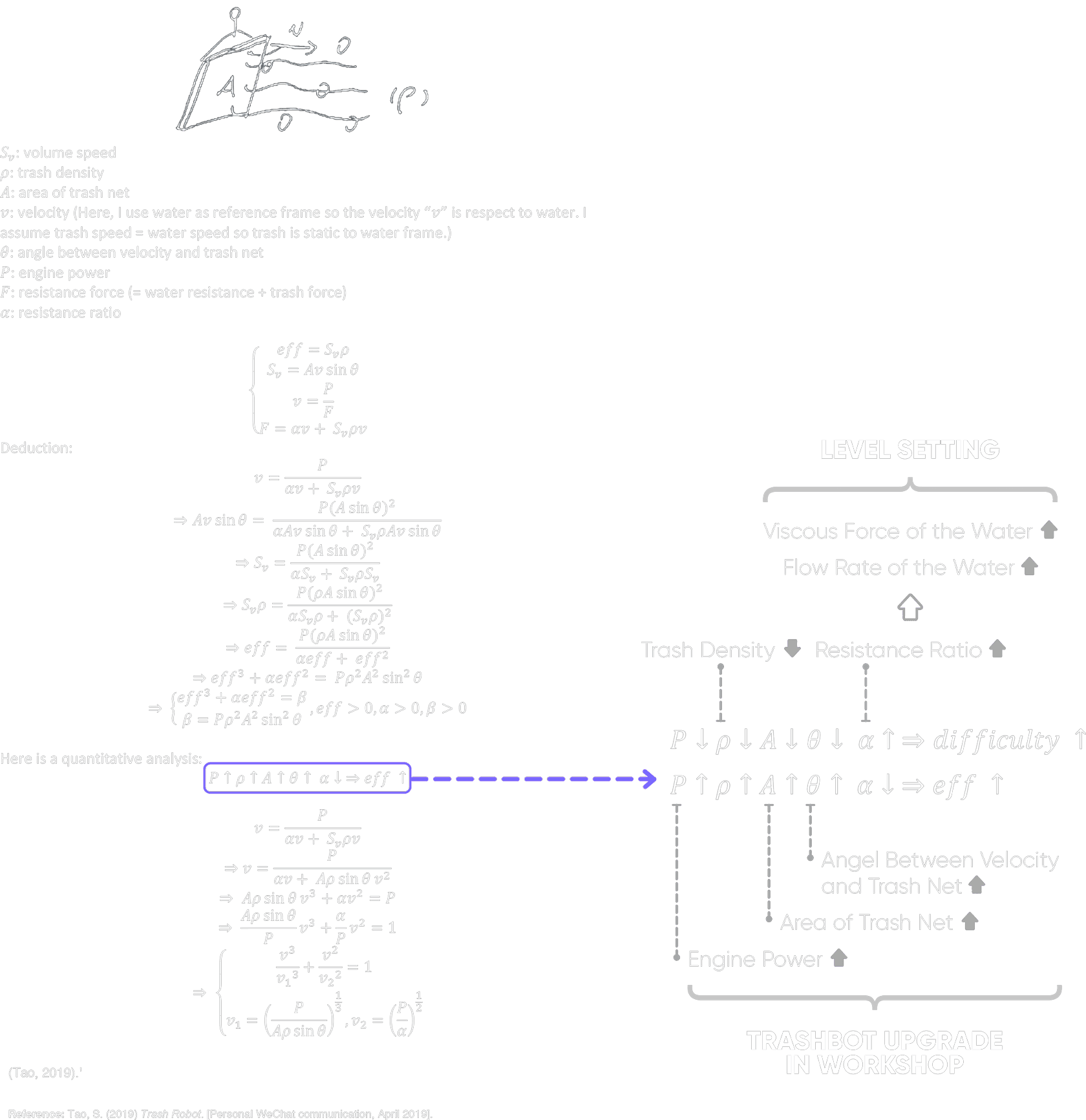
To balance upgrades and level difficulty, I translated Trashbot’s real-world physics into game parameters.
The working-principle model on the left informs two design decisions:
Upgrades: engine power, net area, and the net angle increase score efficiency, so players can upgrade them in the workshop.
Levels: trash density, water flow rate, and water viscosity also affect efficiency, so they become the variables that define level difficulty.
To balance upgrades and level difficulty, I translated Trashbot’s real-world physics into game parameters.
The working-principle model on the left informs two design decisions:
Upgrades: engine power, net area, and the net angle increase score efficiency, so players can upgrade them in the workshop.
Levels: trash density, water flow rate, and water viscosity also affect efficiency, so they become the variables that define level difficulty.
Player Actions
Player Actions
Action 1
Move
Drag left side of the screen
Action 2
Look Around
Drag right side of the screen
Action 3
Toggle Views
Double-tap the screen
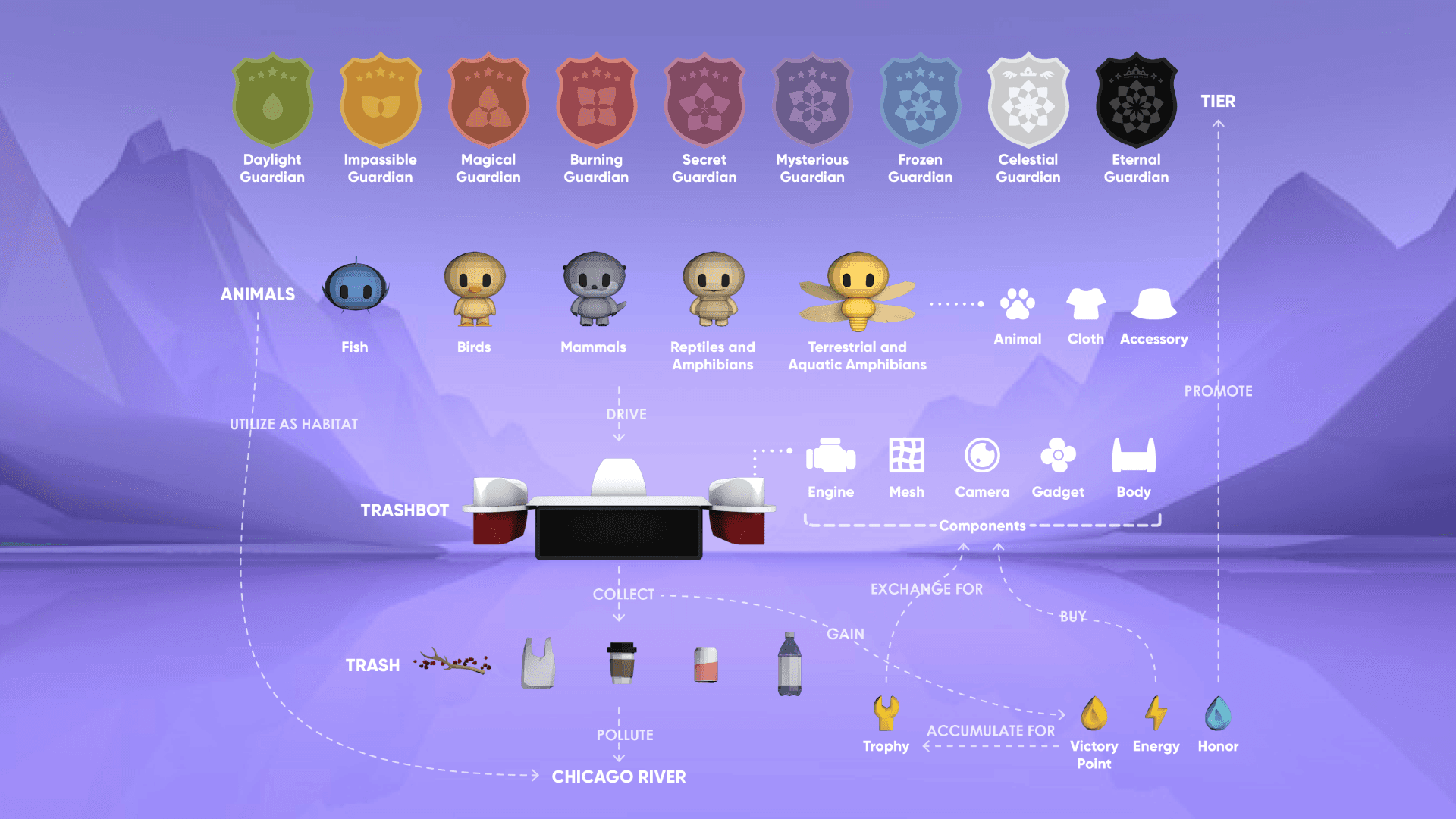
Objects, Properties, Behaviors, Relationships
Objects, Properties, Behaviors, Relationships
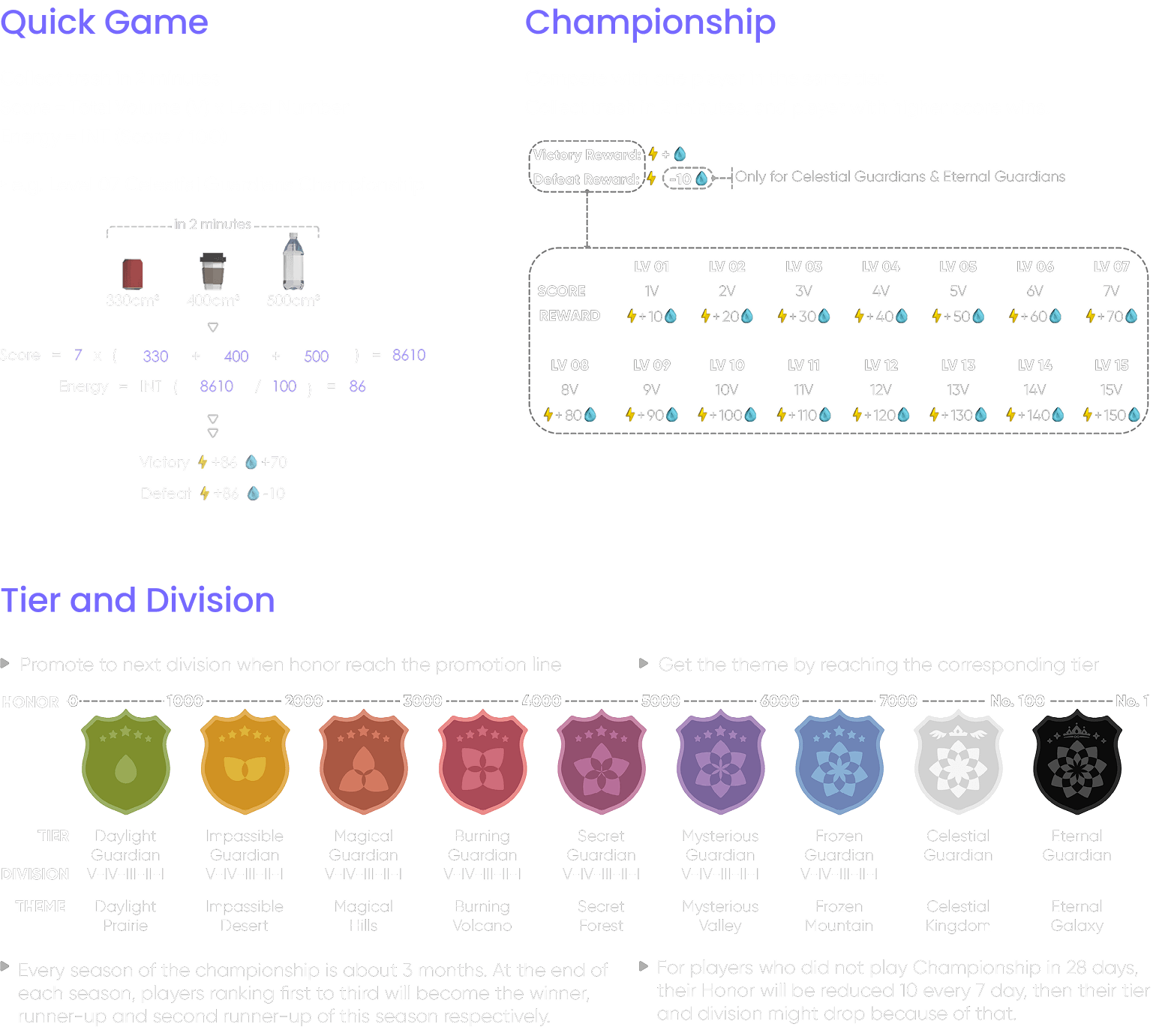
Rules
Rules
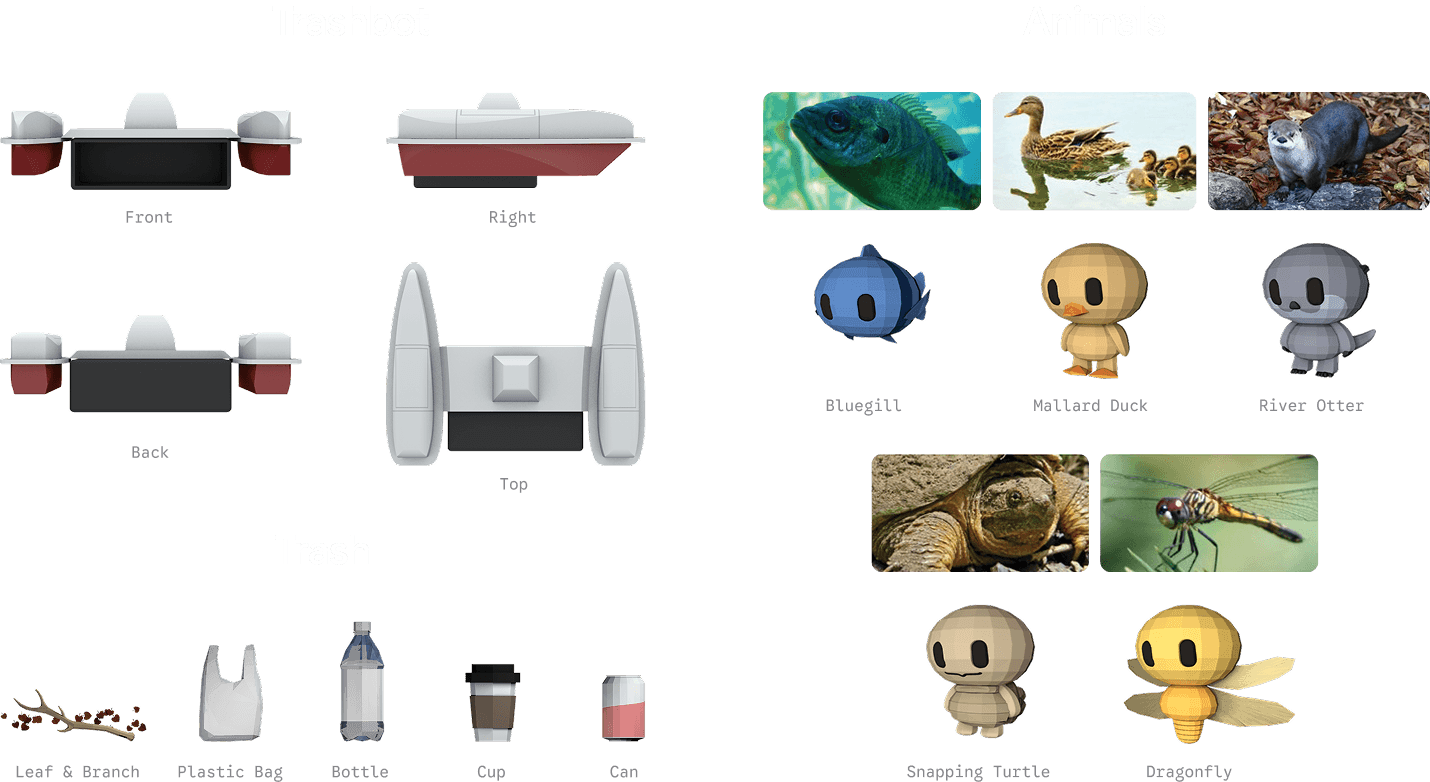
Visual Appearance
Visual Appearance
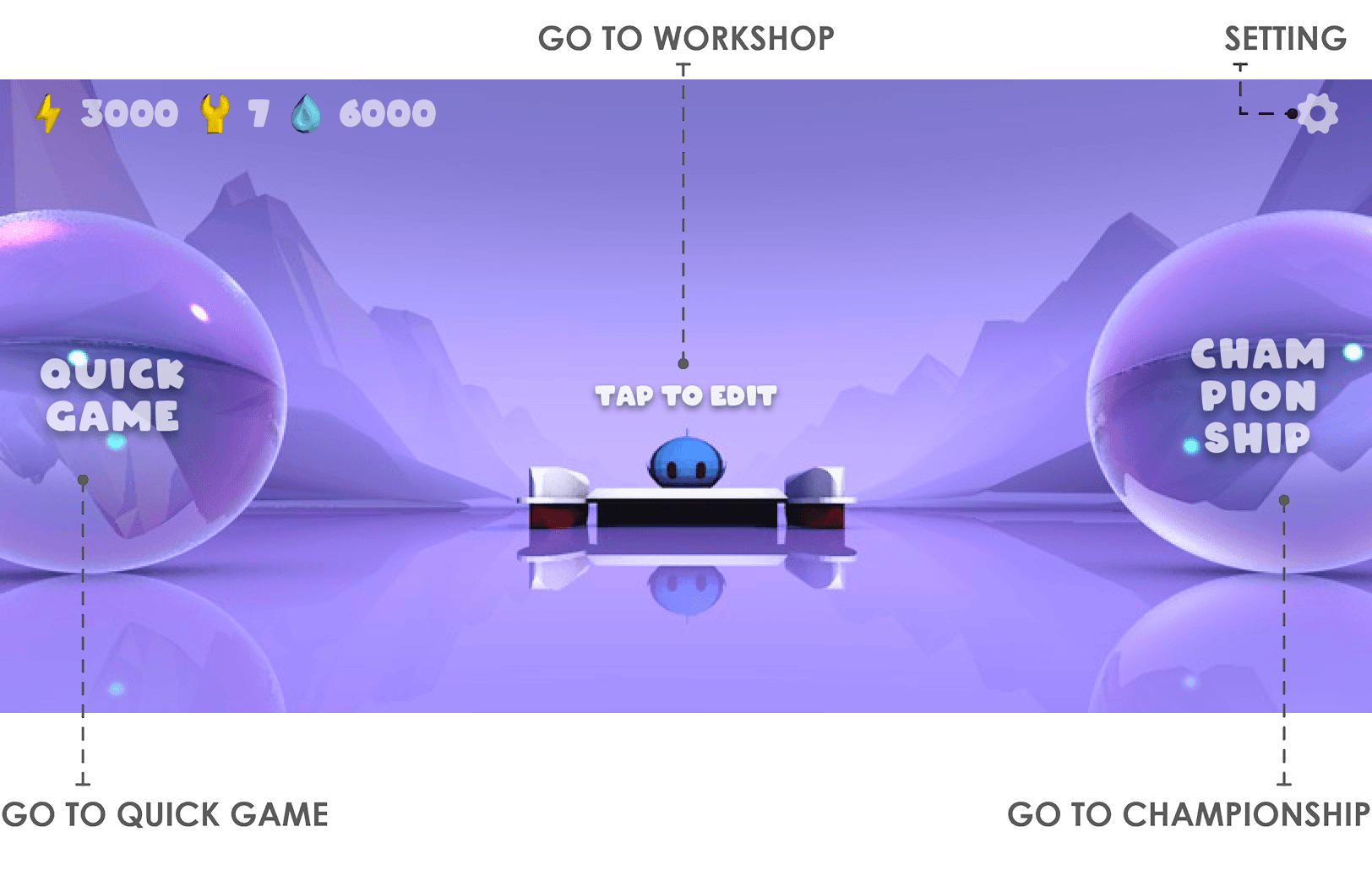
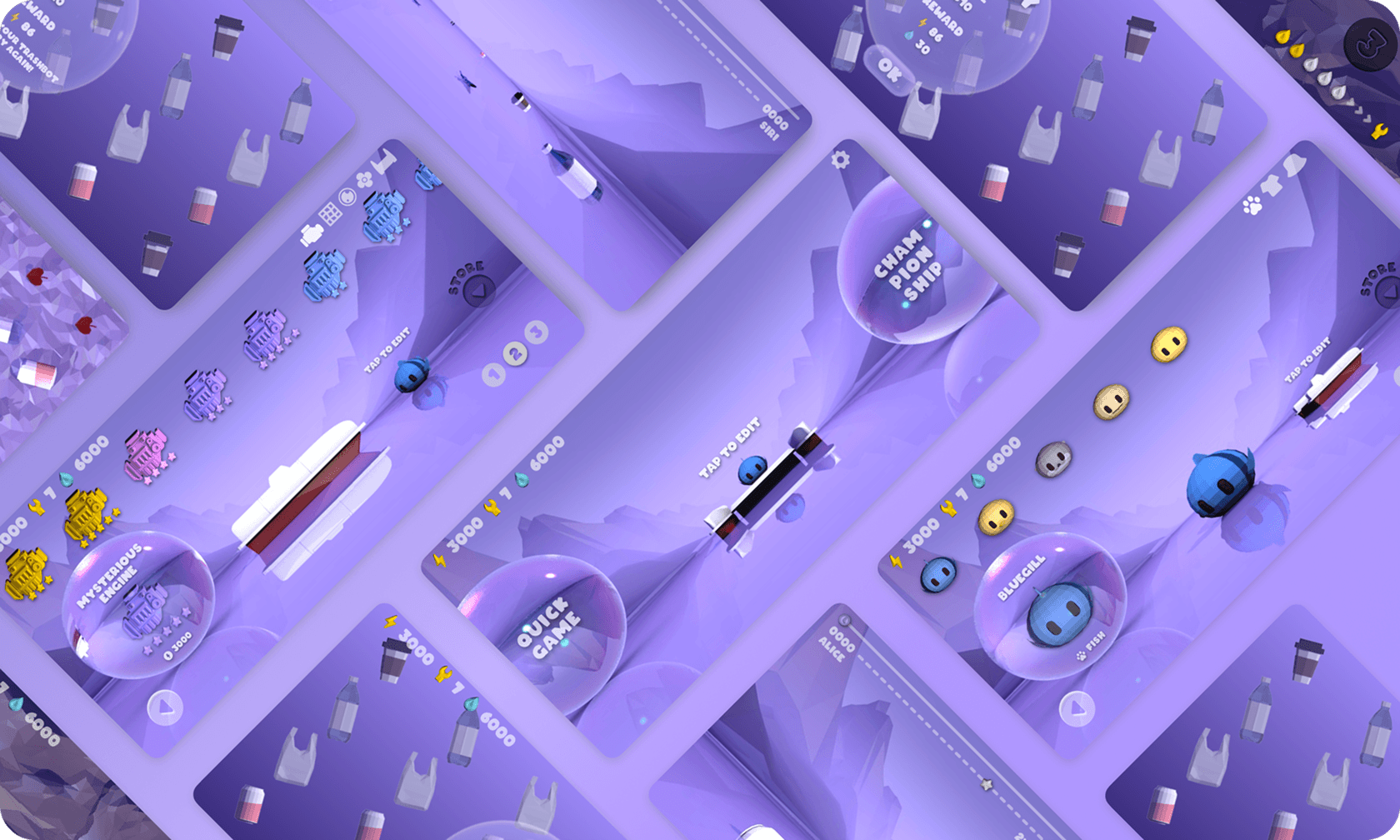
Game Interface
Game Interface
Home
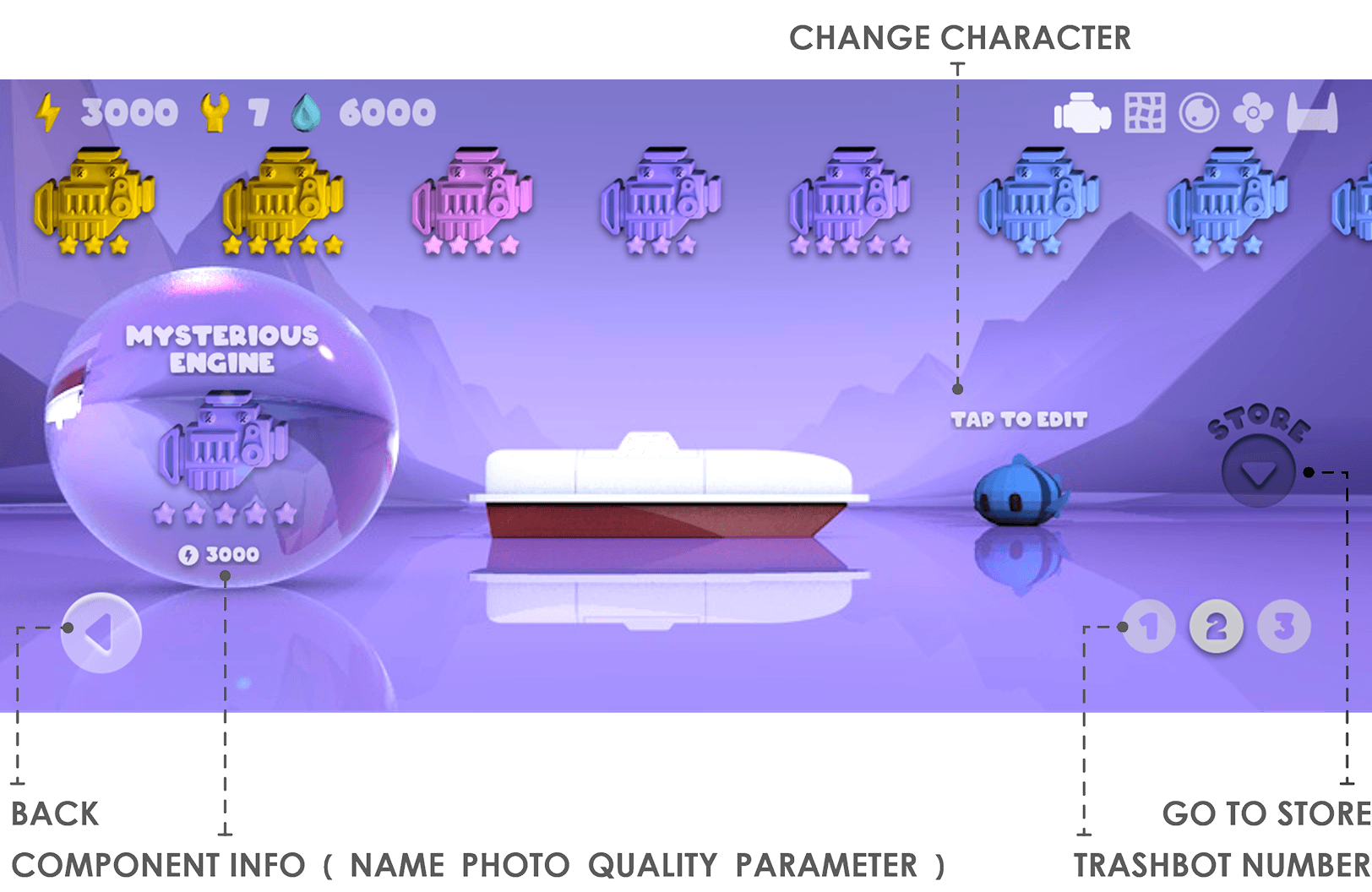
Workshop for Trashbot
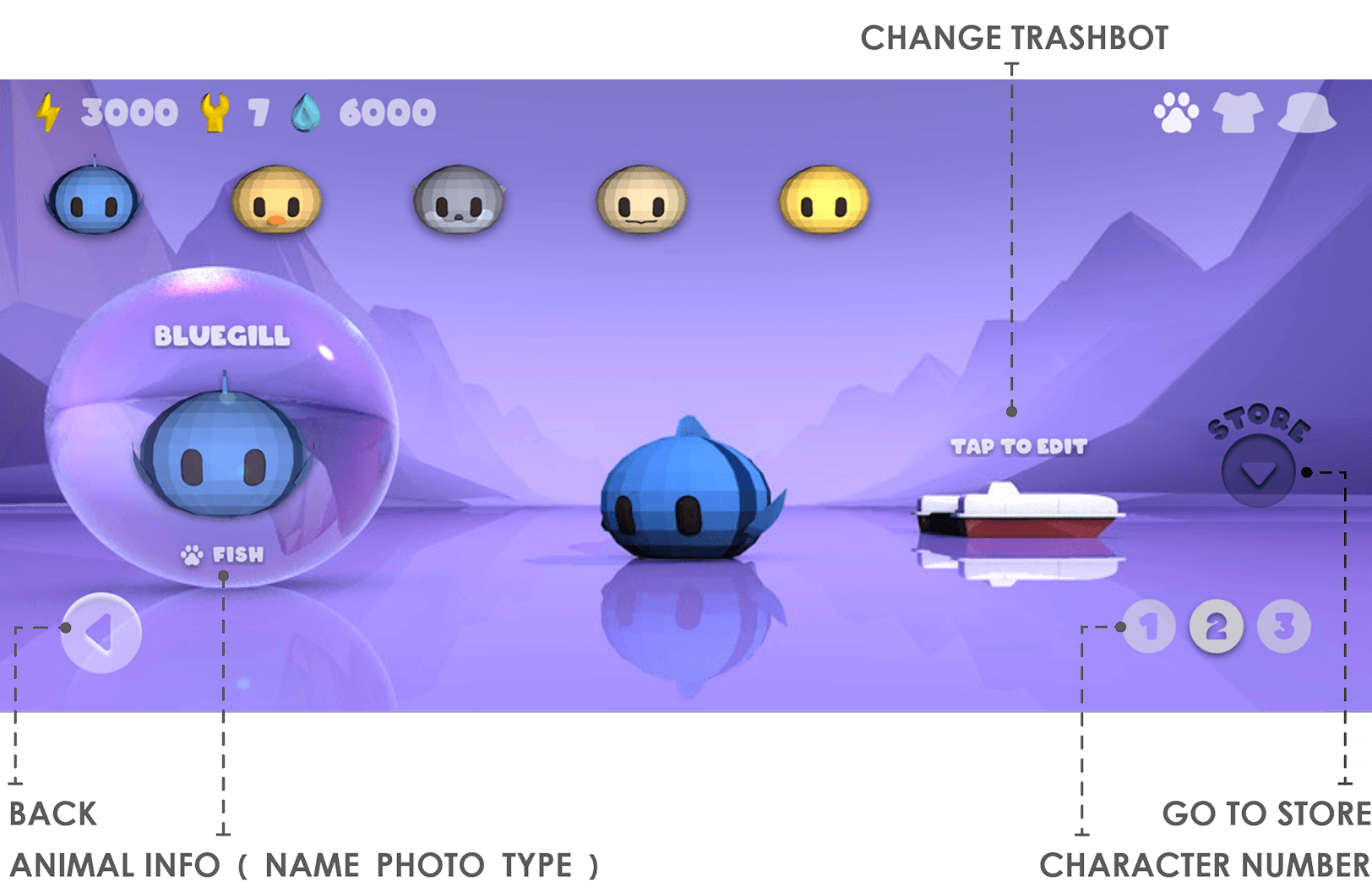
Workshop for Character
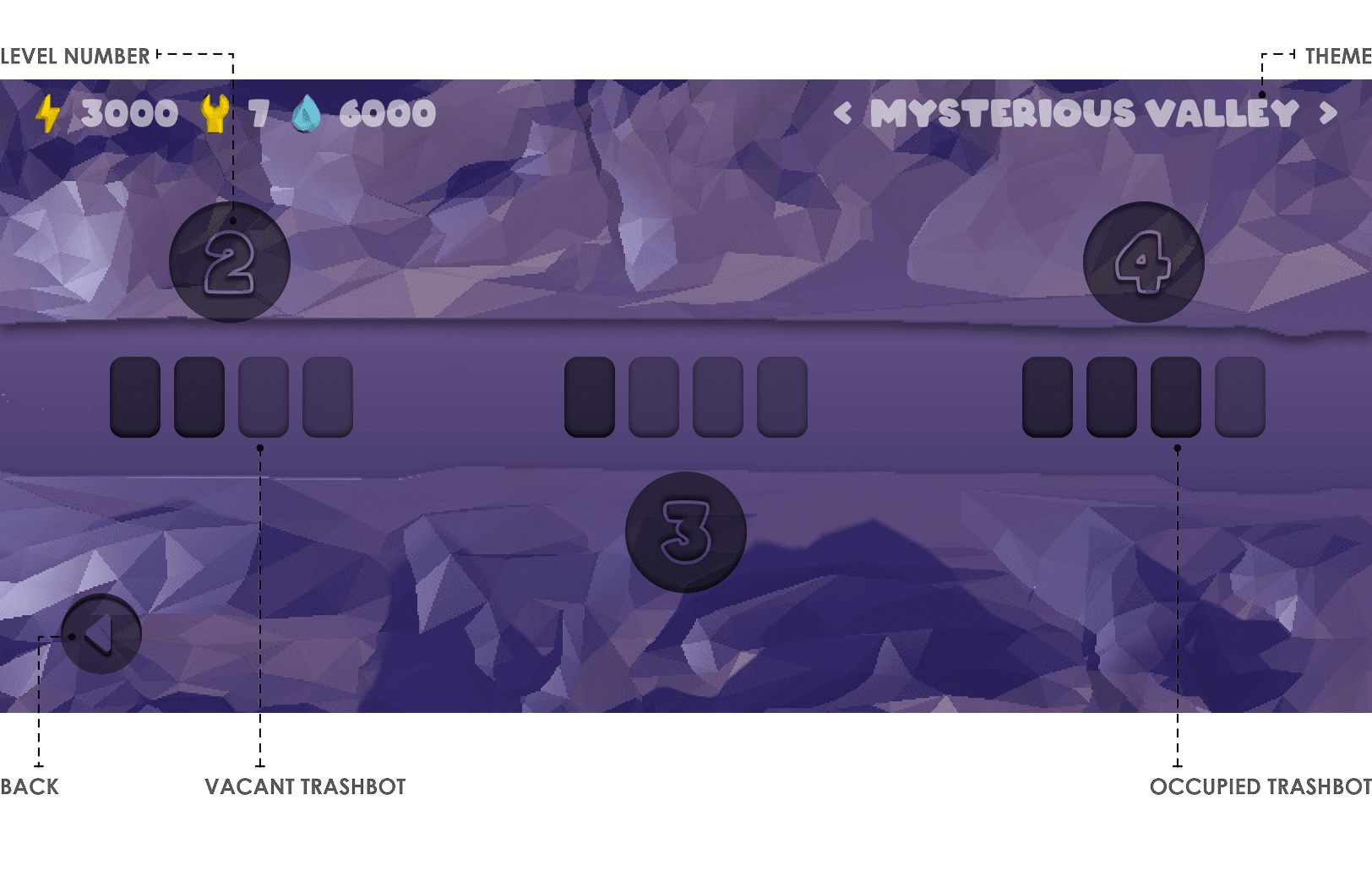
Map for Quick Game
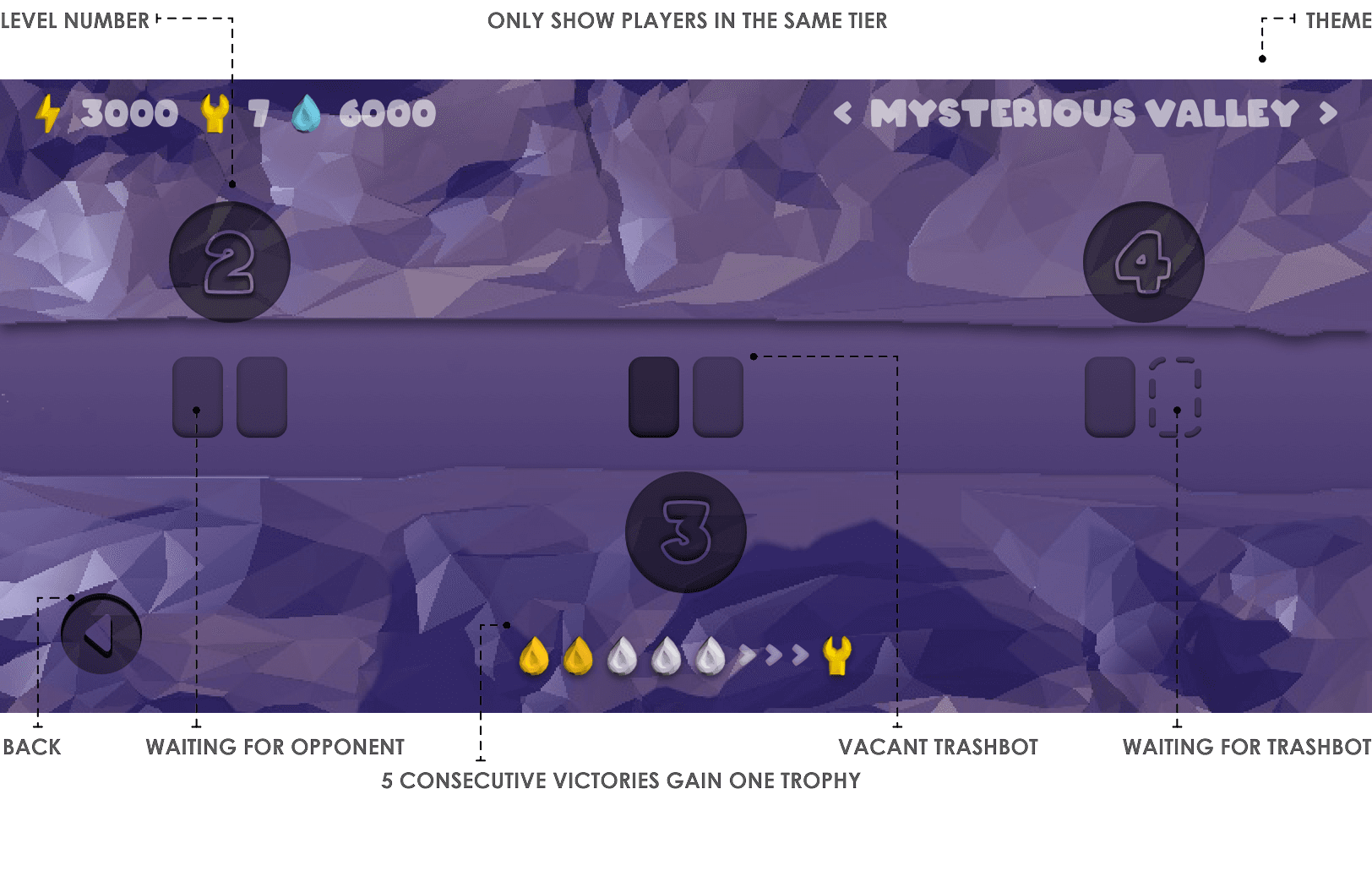
Map for Championship
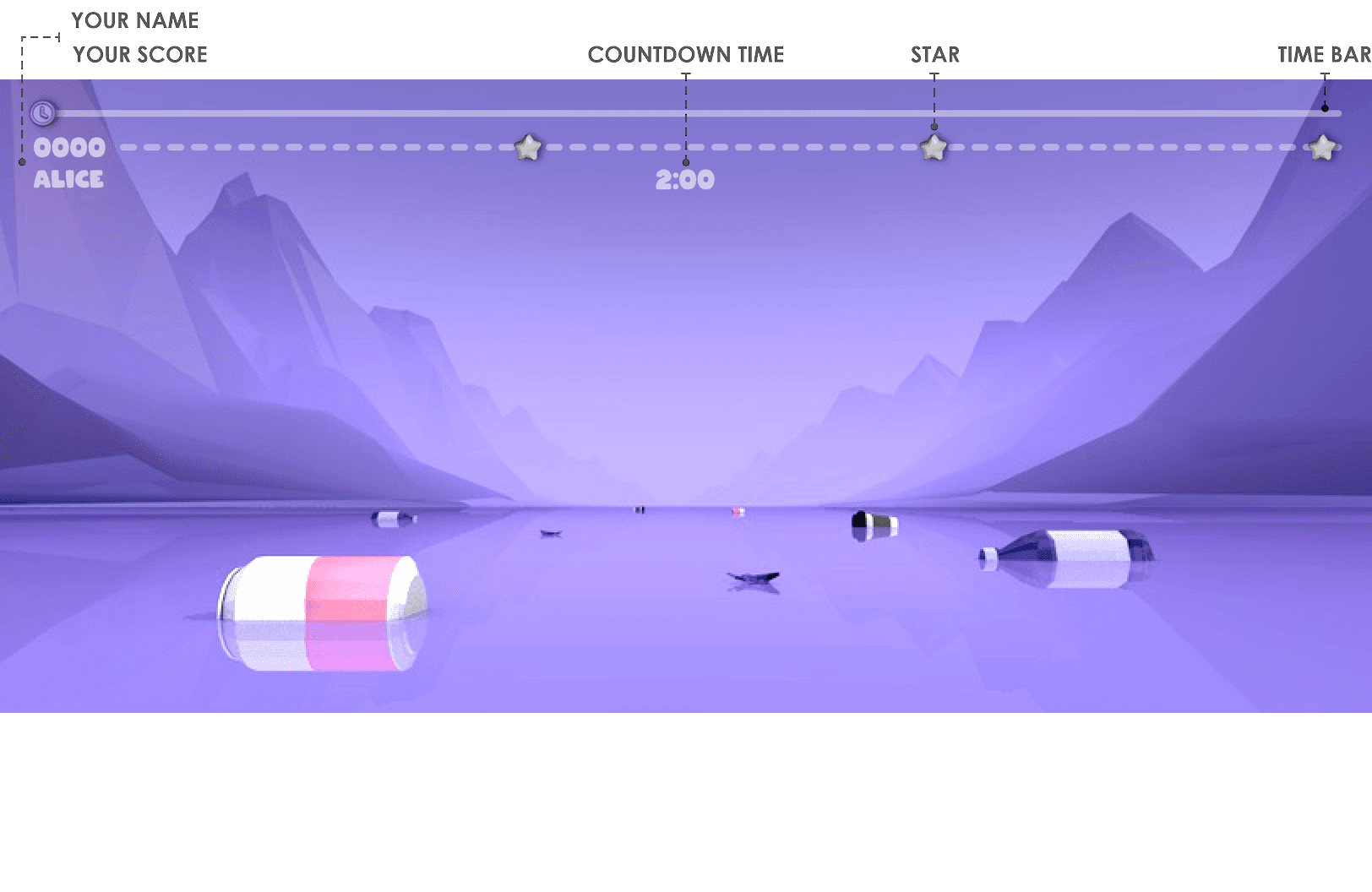
Gameplay for Quick Game
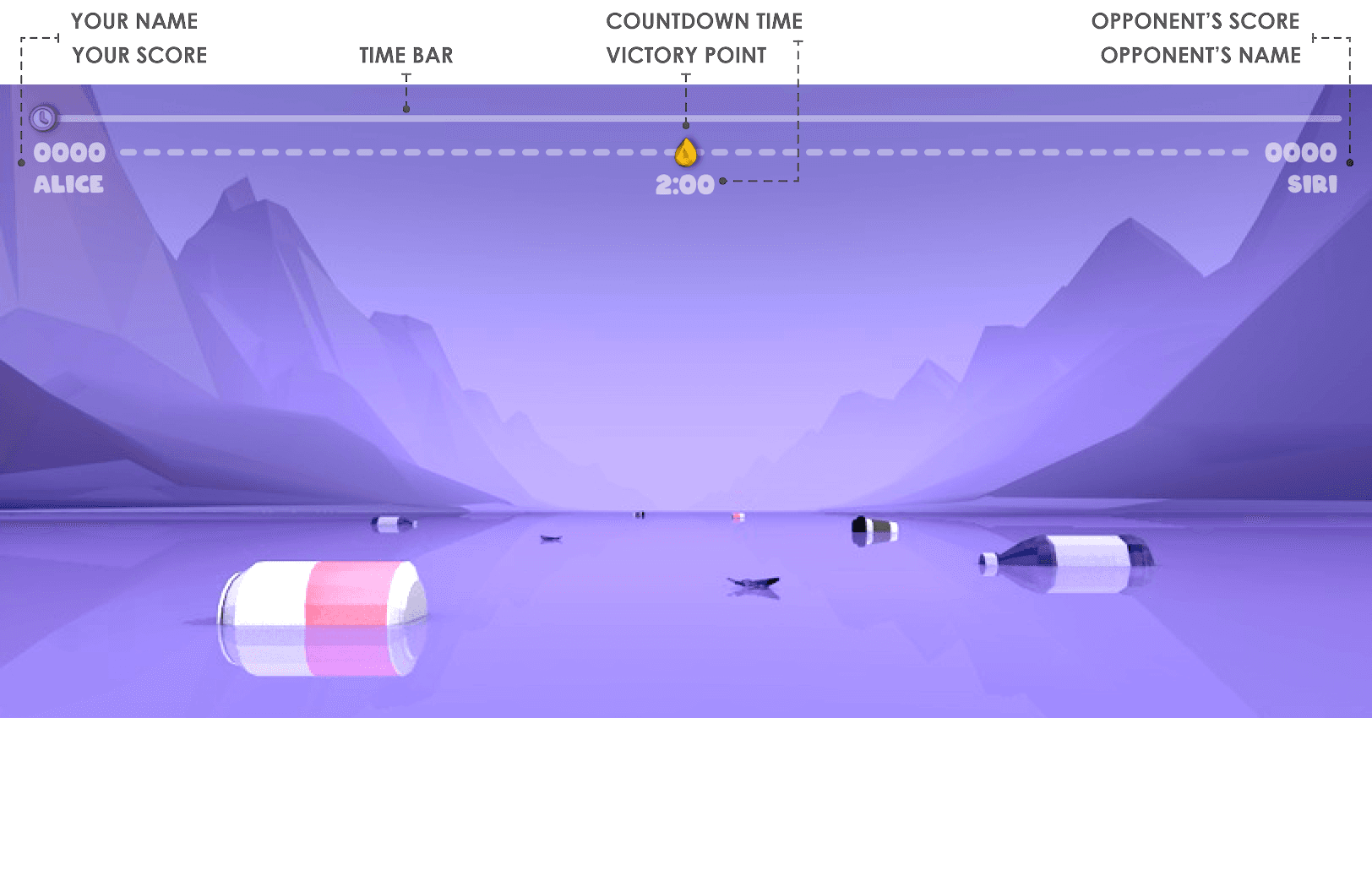
Gameplay for Championship
Home
Workshop for Trashbot
Workshop for Character
Map for Quick Game
Map for Championship
Gameplay for Quick Game
Gameplay for Championship
Home
Workshop for Trashbot
Workshop for Character
Map for Quick Game
Map for Championship
Gameplay for Quick Game
Gameplay for Championship
Home
Workshop for Trashbot
Workshop for Character
Map for Quick Game
Map for Championship
Gameplay for Quick Game
Gameplay for Championship
Design Process
Behind The Scene
Demo Iteration with Processing.py
Design Process
Behind The Scene
Demo Iteration with Processing.py
Modes Ideation
Modes Ideation
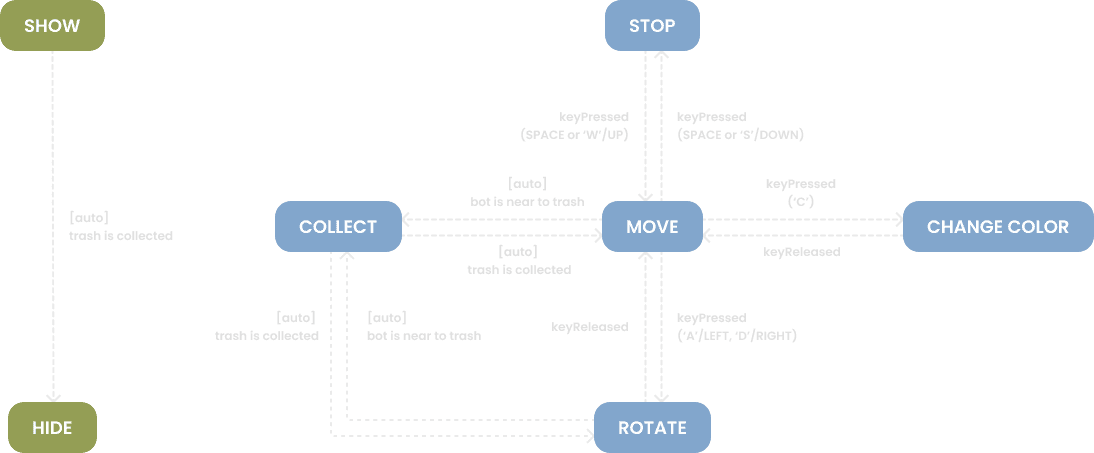
Mode 1
key press → move
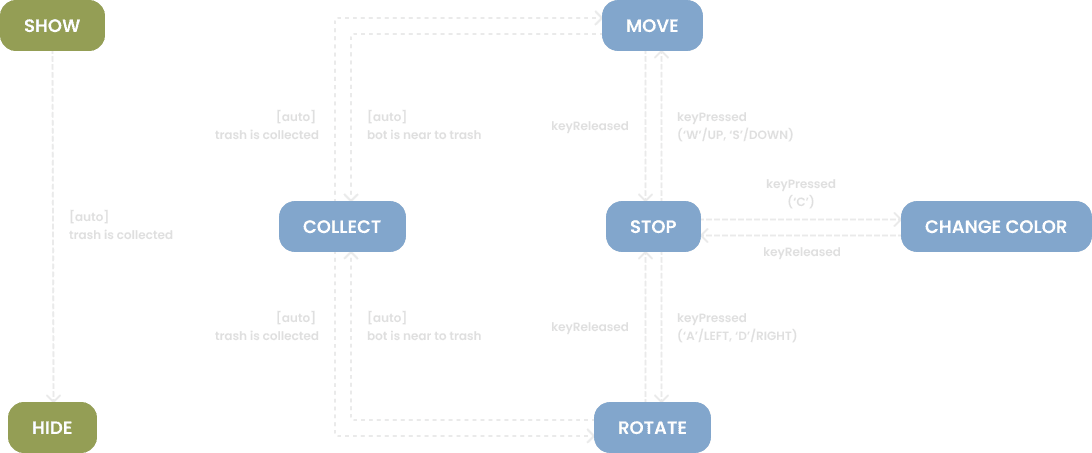
Mode 2
moving → key press → change direction & keep moving
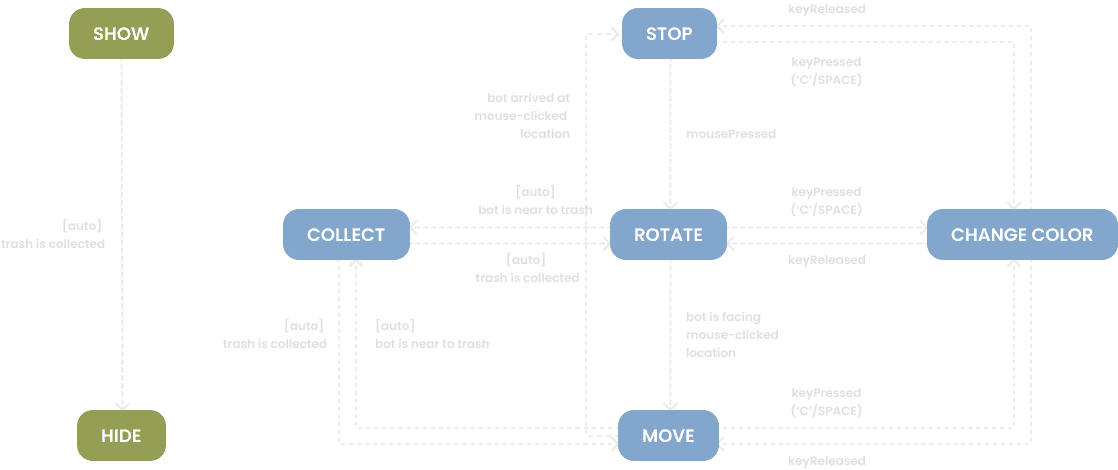
Mode 3
mouse press → move
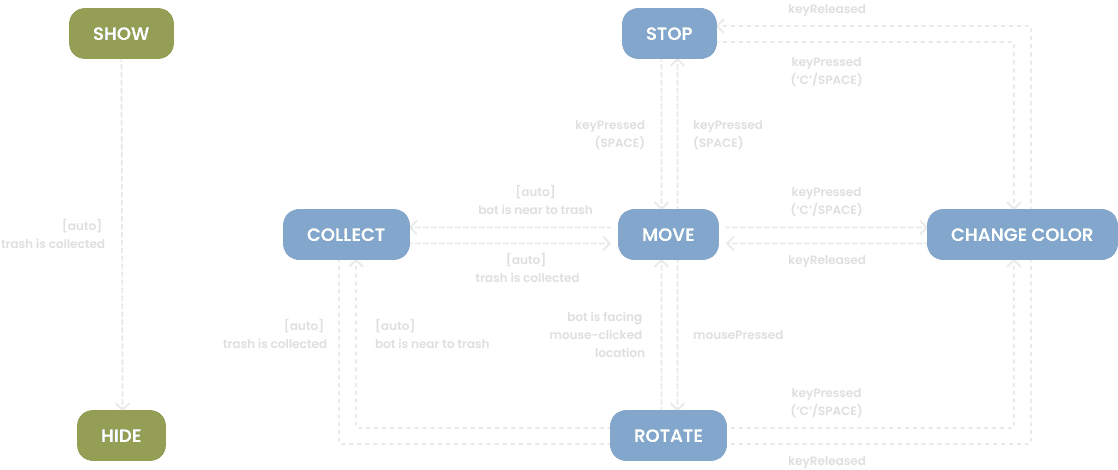
Mode 4
moving → mouse press → change direction & keep moving
Mode 1
key press → move
Mode 2
moving → key press → change direction & keep moving
Mode 3
mouse press → move
Mode 4
moving → mouse press → change direction & keep moving
Mode 1
key press → move
Mode 2
moving → key press → change direction & keep moving
Mode 3
mouse press → move
Mode 4
moving → mouse press → change direction & keep moving
Mode 1
key press → move
Mode 2
moving → key press → change direction & keep moving
Mode 3
mouse press → move
Mode 4
moving → mouse press → change direction & keep moving
All Demo Versions
All Demo Versions
Demo v1.0
Move: WASD | Stop: SPACE | Change Color: C
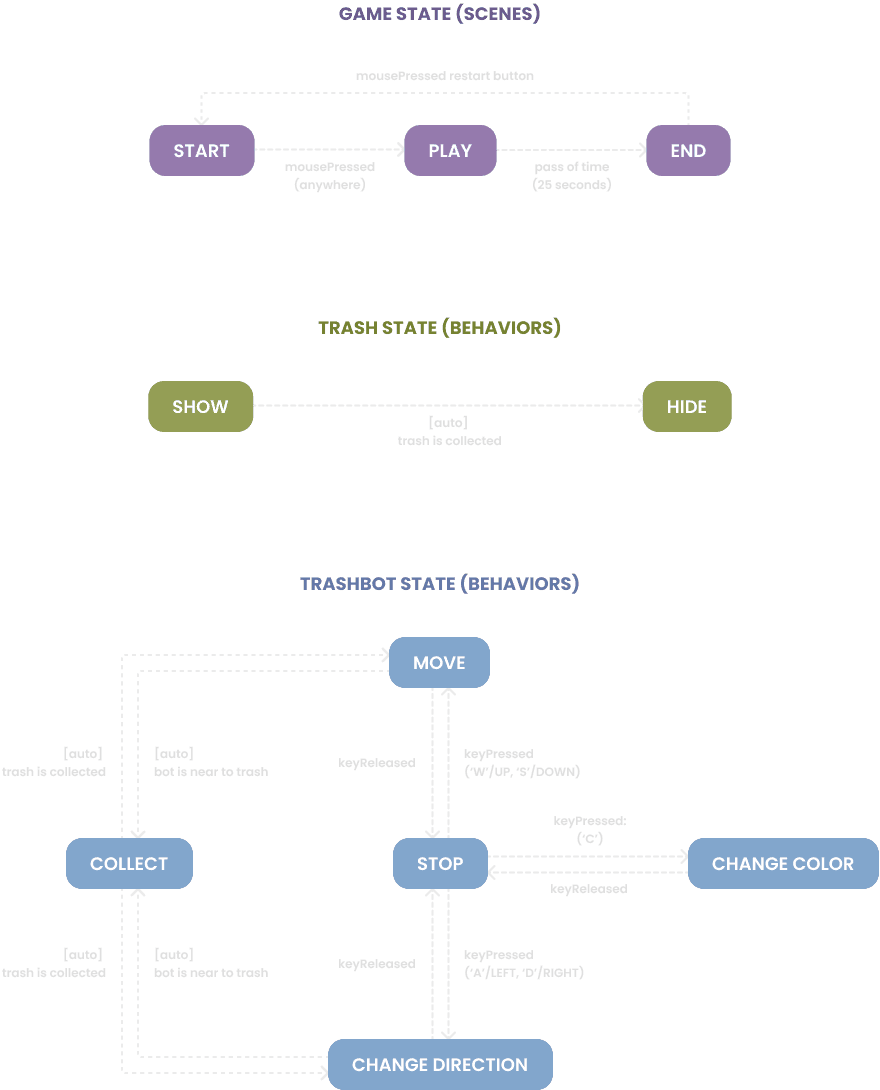
Please click the "▶ ︎Run" button at the top of the window to run the game demo.
Demo v1.1
Move: WASD | Stop: SPACE | Change Color: C
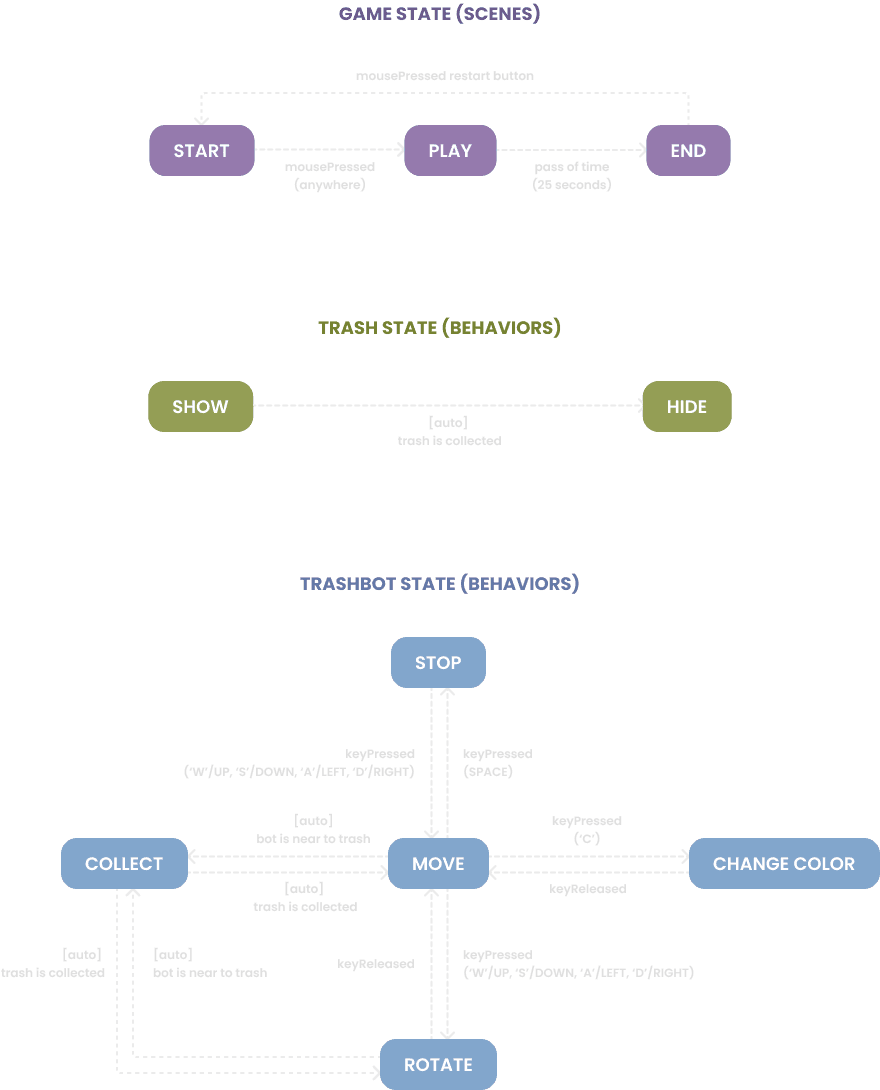
Please click the "▶ ︎Run" button at the top of the window to run the game demo.
Demo v1.2
Move: WASD | Stop: SPACE | Change Color: C
Please click the "▶ ︎Run" button at the top of the window to run the game demo.
Demo v2.0
Move: Left-click
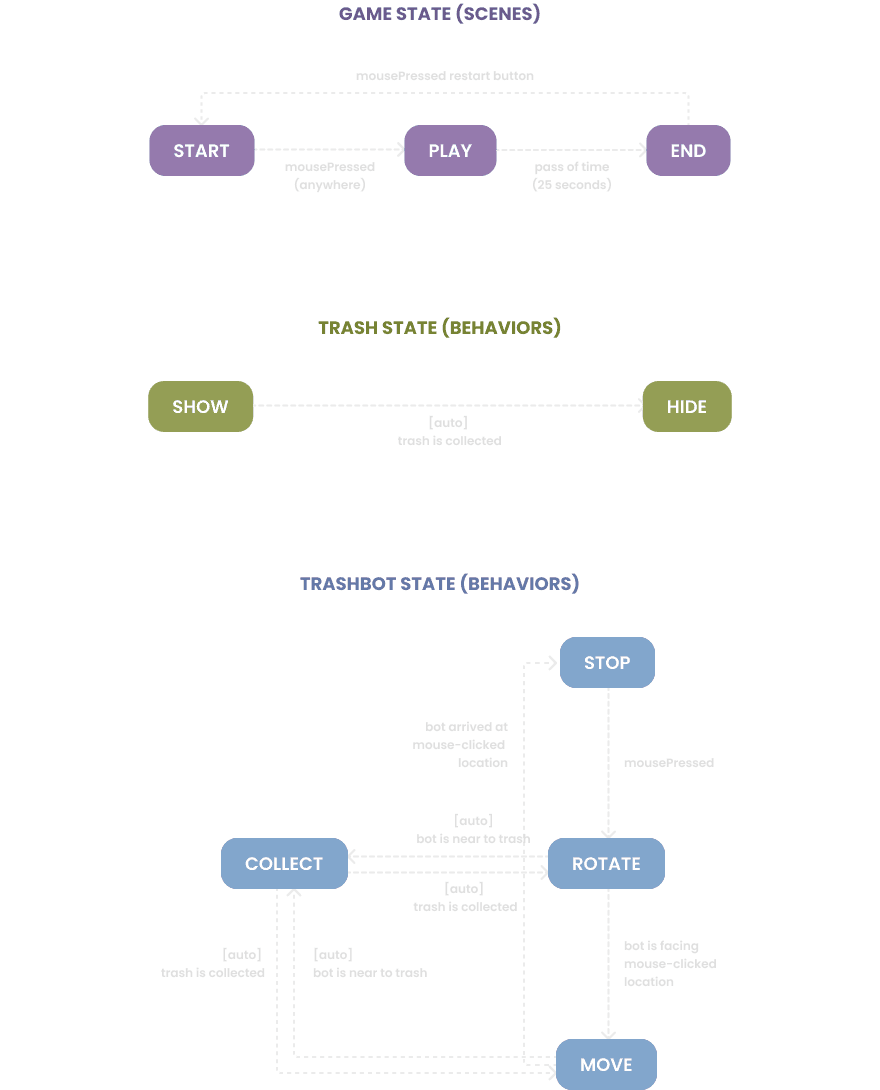
Please click the "▶ ︎Run" button at the top of the window to run the game demo.
Demo v2.1
Move: Left-click
Please click the "▶ ︎Run" button at the top of the window to run the game demo.
Demo v1.0
Move: WASD | Stop: SPACE | Change Color: C
Please click the "▶ ︎Run" button at the top of the window to run the game demo.
Demo v1.1
Move: WASD | Stop: SPACE | Change Color: C
Please click the "▶ ︎Run" button at the top of the window to run the game demo.
Demo v1.2
Move: WASD | Stop: SPACE | Change Color: C
Please click the "▶ ︎Run" button at the top of the window to run the game demo.
Demo v2.0
Move: Left-click
Please click the "▶ ︎Run" button at the top of the window to run the game demo.
Demo v2.1
Move: Left-click
Please click the "▶ ︎Run" button at the top of the window to run the game demo.
Demo v1.0
Move: WASD | Stop: SPACE | Change Color: C
Please click the "▶ ︎Run" button at the top of the window to run the game demo.
Demo v1.1
Move: WASD | Stop: SPACE | Change Color: C
Please click the "▶ ︎Run" button at the top of the window to run the game demo.
Demo v1.2
Move: WASD | Stop: SPACE | Change Color: C
Please click the "▶ ︎Run" button at the top of the window to run the game demo.
Demo v2.0
Move: Left-click
Please click the "▶ ︎Run" button at the top of the window to run the game demo.
Demo v2.1
Move: Left-click
Please click the "▶ ︎Run" button at the top of the window to run the game demo.
Demo v1.0
Move: WASD | Stop: SPACE | Change Color: C
Please click the "▶ ︎Run" button at the top of the window to run the game demo.
Demo v1.1
Move: WASD | Stop: SPACE | Change Color: C
Please click the "▶ ︎Run" button at the top of the window to run the game demo.
Demo v1.2
Move: WASD | Stop: SPACE | Change Color: C
Please click the "▶ ︎Run" button at the top of the window to run the game demo.
Demo v2.0
Move: Left-click
Please click the "▶ ︎Run" button at the top of the window to run the game demo.
Demo v2.1
Move: Left-click
Please click the "▶ ︎Run" button at the top of the window to run the game demo.